圆弧插补螺旋插补运动案例
圆弧插补螺旋插补运动
1.新建项目并附加函数库
(1)在VS2017菜单“文件”→“新建”→ “项目”,启动创建项目向导。

-
选择开发语言为“Visual C++”和程序类型“空项目”。

-
找到厂家提供的SDK库,路径如下(64位release库为例)。


函数库具体路径如下


- 复制【cnc_sdk】到项目目录。

为了保证可以在VS调试器中运行,将相关平台的dll库复制到代码目录(如,项目名称为CncSdkDemo,则放在【{你的工程目录}\CncSdkDemo\CncSdkDemo】目录下),这里以64位平台为例
(将【{你的工程目录}\CncSdkDemo\CncSdkDemo\cnc_sdk\lib\x64】下的“CncApi.dll”和“CncApid.dll”复制到【{你的工程目录}\CncSdkDemo\CncSdkDemo\

(5)进入项目的属性页面。
 在【VC++目录】选项中配置【包含目录】、【库目录】


 在【链接器】-【输入】中配置【附加依赖项】,需要用到CncApi.lib
 【确认】并【应用】
 2.编程
2.编程
(1)【源文件】新建一个main.cpp

 (2)查看函数手册,熟悉相关函数接口
 链接控制器
链接控制器
| 函数名 | 功能 |
| connect | 连接控制器 |
运动参数配置相关接口。
| 函数名 | 功能 |
| setEstop | 该接口设置当前系统的急停状态 |
| setEnable | 该接口设置当前系统的使能状态 |
| setFeedOverride | 该接口设置当前系统进给率 |
| stopProgram | 停止当前系统正在运行的程序 |
| setIniConfig | 设置单个 /多个ini配置的值 |
| setAbsConfig | 设置单个 /多个多圈绝对值配置的值 |
| setMotorRevo | 设置伺服电子齿轮比分子 |
| setShaftRevo | 设置伺服电子齿轮比分母 |
运动接口。
| 函数名 | 功能 |
| moveArcAbs | 绝对圆弧插补 |
| moveArc | 相对圆弧插补 |
| moveHelicalAbs | 绝对螺旋插补 |
| moveHelical | 相对螺旋插补 |
轴状态监控。
| 函数名 | 功能 |
| getInterpState | 该接口将读取机器运行状态 |
| getCoord | 该接口将读取当前坐标值 |
| getIniConfig | 获取指定/全部的ini设置数据 |
| getOpMode | 该接口将读取当前操作模式 |
- 进行轴参数配置和单轴运动控制
4.调试与监控
#include <iostream>
#include <windows.h>
#include "CncApi.h"

int main()
{

    weconcnc::CCommApi *pComm = new weconcnc::CCommApi();
    weconcnc::CProxyEntry *pEntry = new weconcnc::CProxyEntry(pComm);
    weconcnc::CProxyMotion *pMotion = pEntry->getProxyMotion();

    weconcnc::WECONCNC_ERROR_E ret = weconcnc::WECONCNC_ERROR_SUCCESS;

    std::string sIp = "192.168.54.98";
    ret = pComm->connect(sIp, 9995);
    if (weconcnc::WECONCNC_ERROR_SUCCESS != ret) {
        std::cout << "connect failed!" << std::endl;
        return -1;
    }

    POSITION_T posStart;
    posStart.x = 100;
    posStart.y = 200;
    posStart.z = 300;

    POSITION_T posEnd;
    posEnd.x = 200;
    posEnd.y = 300;
    posEnd.z = 400;

    POSITION_T posCenter;
    posCenter.x = 50;
    posCenter.y = 100;


    ret = pMotion->moveArcAbs(posStart, posEnd, posCenter, 1000, 1);
    if (weconcnc::WECONCNC_ERROR_SUCCESS != ret) {
    std::cout << "move failed!" << std::endl;
        return -1;
    }

    return 0;
}
通过getCoord进行当前坐标值获取监控
int main()
{

    weconcnc::CCommApi *pComm = new weconcnc::CCommApi();
    weconcnc::CProxyEntry *pEntry = new weconcnc::CProxyEntry(pComm);
    weconcnc::CProxyStatus *mcstatus = pEntry->getProxyStatus();

    WECONCNC_ERROR_E ret = WECONCNC_ERROR_SUCCESS;
    COORDINATE_T coord;

    ret = mcstatus->getCoord(coord);
    if (WECONCNC_ERROR_SUCCESS != ret) {
        std::cout << "get coord failed!" << std::endl;
        return -1;
    }

    std::cout << "coord: " << coord.getY() << std::endl;

    return 0;
}

使用Waux.h中的接口实现方式
1.声明用到的头文件(Zaux.h)和定义控制器连接

- 链接控制器,获取链接句柄。
| 指令 | 说明 |
| WAux_OpenCom | 串口连接控制器 |
| WAux_OpenEth | 以太网连接控制器 |
| WAux_OpenPci | PCI 卡连接 |
| WAux_FastOpen | 与控制器建立连接,指定连接的等待时间. |
- 轴参数配置相关接口。
| 指令 | 说明 |
| WAux_Direct_SetAtype | 设置轴类型 |
| WAux_Direct_SetUnits | 设置轴脉冲当量 |
| WAux_Direct_SetInvertStep | 设置脉冲输出模式 |
| WAux_Direct_SetSpeed | 设置轴速度 |
| WAux_Direct_SetAccel | 设置轴加速度 |
| WAux_Direct_SetDecel | 设置轴减速度 |
| WAux_Direct_SetSramp | 设置轴S曲线 |
| WAux_Direct_GetAtype | 读取轴类型 |
| WAux_Direct_GetUnits | 读取轴脉冲当量 |
| WAux_Direct_GetInvertStep | 读取脉冲输出模式 |
| WAux_Direct_GetSpeed | 读取轴速度 |
| WAux_Direct_GetAccel | 读取轴加速度 |
| WAux_Direct_GetDecel | 读取轴减速度 |
| WAux_Direct_GetSramp | 读取轴S曲线设置 |
- 单轴运动接口。
| 函数名 | 功能 |
| WAux_Direct_MoveCircAbs | 绝对圆弧插补 |
| WAux_Direct_MoveCirc | 相对圆弧插补 |
| WAux_Direct_MHelicalAbs | 绝对螺旋插补 |
| WAux_Direct_MHelical | 相对螺旋插补 |
(4)轴状态监控。
| 指令 | WAux_Direct_GetAxisStatus |
| 指令原型 | int32 __stdcall WAux_Direct_GetAxisStatus(ZMC_HANDLE handle, int iaxis, int *piValue) |
| 指令说明 | 读取当前轴的状态。 |
| 输入参数 | 共有2个输入参数,见下方说明。 |
| handle | 链接标识。 |
| iaxis | 轴号。 |
| 输出参数 | 共有1个输出参数,见下方说明。 |
| piValue | 返回状态值,对应的位表示不同状态。
|
| 返回值 | 见错误码详细说明。 |
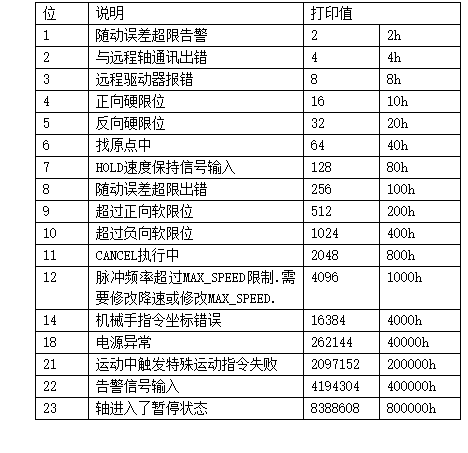
2.进行轴参数配置和单轴运动控制
#include "Waux.h"
#include <iostream>
#include <windows.h>
using namespace weconcnc;


void commandCheckHandler(const char *command, int ret)
{
    if (ret)//非 0 则失败
    {
        printf("%s return code is %d\n", command, ret);
    }

}

int main()
{

    char *ip_addr = (char *)"192.168.54.98"; //控制器 IP 地址
    ZMC_HANDLE handle = NULL; //连接句柄

    int ret = WAux_OpenEth(ip_addr, &handle); //连接控制器
    if (ERR_SUCCESS != ret)
    {
        printf("connect controller failed!\n");
        handle = NULL;
        getchar();
        return -1;
    }
    printf("控制器连接成功!\n");

    int *piAxislist;
    WAux_Direct_SetAtype(handle, 0, 1); //设置轴 0 轴类型为 1
    WAux_Direct_SetUnits(handle, 0, 100); //设置轴 0 脉冲当量为 100
    WAux_Direct_SetSpeed(handle, 0, 200); //设置轴 0 速度为 200units/s
    WAux_Direct_SetAccel(handle, 0, 2000); //设置轴 0 加速度为 2000units/s/s
    WAux_Direct_SetDecel(handle, 0, 2000); //设置轴 0 减速度为 2000units/s/s
    WAux_Direct_SetSramp(handle, 0, 200); //设置轴 0 S 曲线为 200ms
    ret = WAux_Direct_SetDpos(handle, 0, 0);//轴指令位置清 0
    commandCheckHandler("WAux_Direct_SetDpos", ret);//判断指令是否执行成功
    ret = WAux_Direct_SetMpos(handle, 0, 0);//编码器反馈位置清 0
    commandCheckHandler("WAux_Direct_SetMpos", ret);//判断指令是否执行成功
    ret = WAux_Direct_MoveCircAbs(handle, 3, piAxislist, 300, 300, 50, 100, 1);

    if (0 == ret) {

        printf("run success\n");
    }
    else {

        printf("run fail\n");
    }

    commandCheckHandler("WAux_Direct_SetDpos", ret);//判断指令是否执行成功
    float IDLE = 0.0;
    while (1)//等待轴 0 运动完成
    {
        Sleep(100);
        ret = WAux_Direct_GetParam(handle, "IDLE", 0, &IDLE);
        printf("ret = %d IDLE = %f\n", ret, IDLE);
        if (IDLE < 0)break;
    }

    int32_t iValue;
    WAux_BusCmd_SDOReadAxis(handle, 0, 0x6061, 0x6061, 1, &iValue);

    ret = WAux_Direct_Single_MoveAbs(handle, 1, 100);
    if (0 == ret) {

        printf("run success\n");
    }
    else {

        printf("run fail\n");
    }
    commandCheckHandler("WAux_Direct_SetDpos", ret);//判断指令是否执行成功
    while (1)//等待轴 0 运动完成
    {
        Sleep(100);
        WAux_Direct_GetParam(handle, "IDLE", 0, &IDLE);
        if (IDLE < 0)break;
    }
    Sleep(2000);
    ret = WAux_Close(handle); //关闭连接
    commandCheckHandler("WAux_Close", ret);//判断指令是否执行成功
    printf("connection closed!\n");
    handle = NULL;
    return 0;
}
void CSingle_move_Dlg::OnTimer(UINT_PTR nIDEvent)
{
    if (NULL == g_handle) {
        MessageBox(_T("链接断开"));
        return;
    }
    if (1 == nIDEvent)
    {
        CString string;
        float position = 0;
        WAux_Direct_GetDpos(g_handle, m_nAxis, &position);          //获取当前轴位置
        string.Format("当前位置:%.2f", position );
        GetDlgItem( IDC_CURPOS )->SetWindowText( string );
        float NowSp = 0;
        WAux_Direct_GetVpSpeed( g_handle,m_nAxis,&NowSp);          //获取当前轴速度
        string.Format("当前速度:%.2f", NowSp );
        GetDlgItem( IDC_CURSPEED)->SetWindowText( string );
        int status = 0;         WAux_Direct_GetIfIdle(g_handle, m_nAxis,&status);           //判断当前轴状态
        if (status == -1) {

            GetDlgItem( IDC_CURSTATE )->SetWindowText( "当前状态:停  止" );
        }
        else {
            GetDlgItem( IDC_CURSTATE )->SetWindowText( "当前状态:运动中" );
        }
    }
    CDialog::OnTimer(nIDEvent);
}